Kobo - Back It Up!

I’ve been a proud Kobo Aura H2O Edition 2 owner and user since 2017, and I couldn’t be happier. But a few days ago, I was importing a pdf file to calmly ready to my son, and allas trouble in paradise! The pdf file was somewhat corrupted, and while transferring to my device using Calibre, it borked and corrupted the internal database. It kept freezing a 6% and rebooted. It rendered unusable for transferring any other files. I could use it, but not to import new files.
Solution: do a factory reset.
With a factory reset comes a caveat: while giving the device a clean slate and making it essentially new again, it looses all the files, notes, annotations, soduku’s scores (my wife’s) from all theses years of usage. Luckily I had a back-up made last august for something like this I actually didn’t expect to happen. I strongly recommend you make one at least one by trimester.
How to perform a backup? Quite easy!!
- Plugin your device to your computer
- Authorize it
- Go to the root of your device and on the file explorer, make sure to view hidden files
- Gnome » CTRL+H
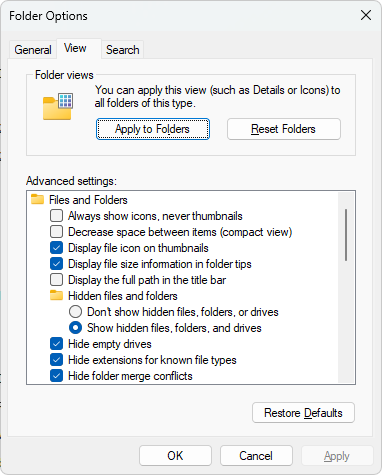
- Windows » Folder options; View; Show hidden files, folders and drives
- Select all files and copy them to a secure place;
So in the chance of Kobo Armageddon – like I had – you don’t have to panic.